
AI Agents for Beginners: A Simple Guide to What They Are and How You Can Use Them
A beginner friendly introduction to AI agents, explained in simple language. Learn what they are, what they can do, how to use them and the differences between APIs and on premise setups.
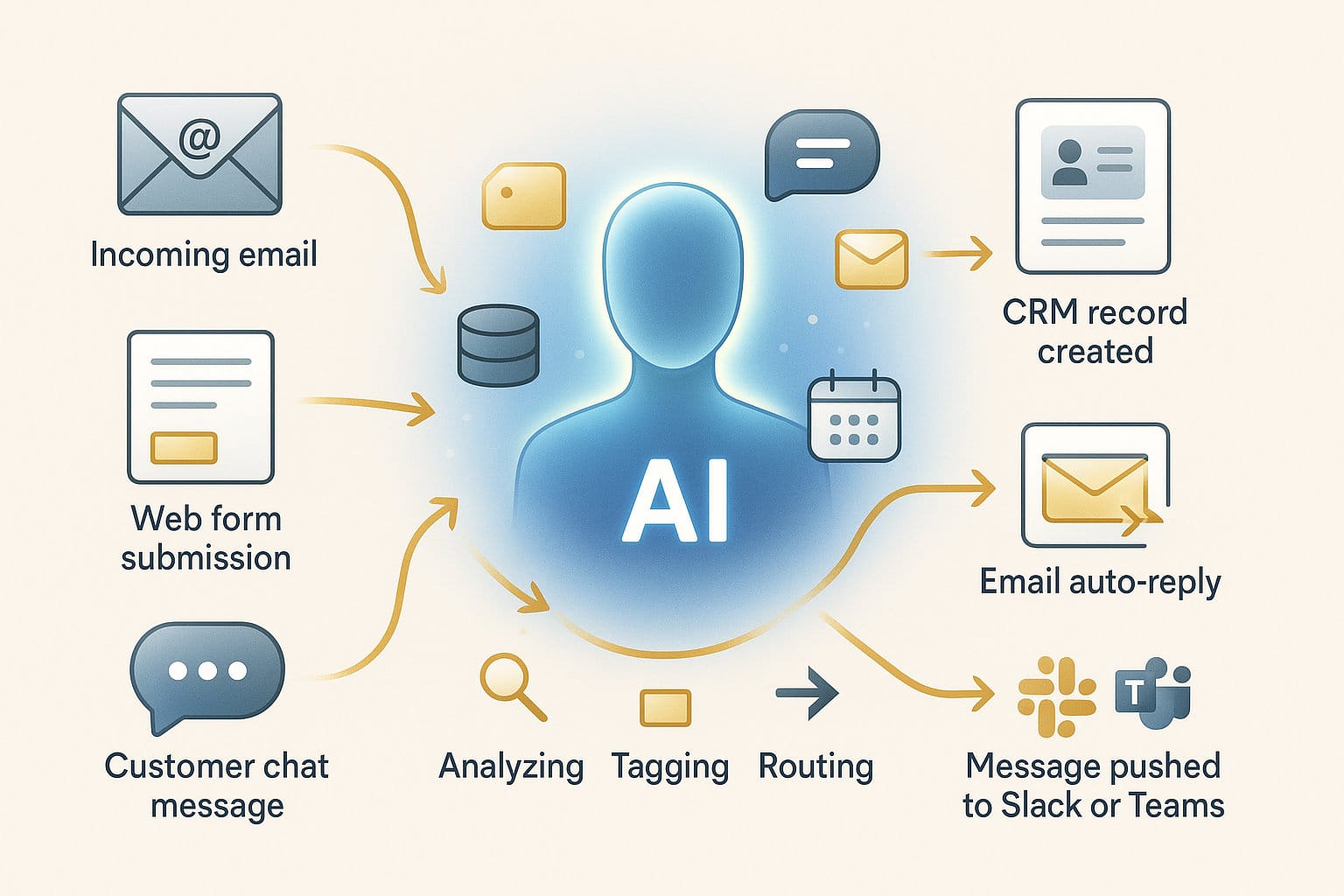
AI is everywhere, and one term keeps popping up: AI agents. The name sounds technical, but the idea is very simple. An AI agent is a digital helper that can do tasks for you. You tell it the goal, and it figures out the steps on its own.
This guide explains AI agents in clear, everyday language so anyone can understand them, even without technical skills.
What is an AI agent in simple words
An AI agent is a smart program that can:
- Listen to what you want
- Think about what needs to be done
- Do the steps by itself
- Check if the result is correct
So instead of you giving instructions every time, the agent simply gets the job done.
Think of it like a digital assistant who says:
“Don’t worry, I’ll handle this.”

A very simple example
Imagine you say:
“Find three good CRM systems, compare them, and give me a short summary.”
A normal AI chatbot would only explain what a CRM is.
An AI agent does this instead:
- Searches online
- Compares features
- Checks pricing
- Writes a summary
- Asks if you want it emailed to someone
All without extra instructions.
What can an AI agent actually do
A lot. Here are easy examples:
1. Find and organise information
Search for details, collect them and summarise everything for you.
2. Clean up your email inbox
Sorts emails, marks important ones, and writes draft replies.
3. Work with documents
Translates text, rewrites content or summarises long reports.
4. Fix messy spreadsheets
Finds duplicates, corrects formats, and highlights errors.
5. Use websites and apps
Some agents can click buttons, fill forms and read information from screens.
6. Run tasks on a schedule
Examples:
- A daily report
- A weekly comparison
- Hourly data checks
Agents keep working even when you’re not there.

How to start using an AI agent
Here is the easiest path for beginners:
Step 1: Choose one small task
Examples:
- Summarise new emails each morning.
- Check daily sales numbers.
- Compare three suppliers once a week.
Starting small keeps things simple.
Step 2: Choose where the agent will run
You can run agents:
- Online (the easiest way)
- In automation tools like Make.com or Zapier
- On your own server (for full control)
- On your laptop or desktop (on-premise)
Step 3: Give it a goal, not detailed steps
Agents are good at planning.
Say this:
“Make sure the weekly report is complete.”
Instead of:
“Do step 1, then step 2, then step 3.”
Step 4: Let it test and retry
Agents learn by doing.
If something breaks, they can try again with a different approach.
Step 5: Adjust when your needs change
Agents are flexible.
You can update tasks any time.
APIs explained in simple language
What is an API
An API is like a digital door.
Your AI agent walks through this door to talk to apps and tools.
Through an API, the agent can:
- Create an invoice
- Save a customer in a CRM
- Look up product data
- Send a message
- Pull numbers from a database
You don’t see the door, but the agent uses it behind the scenes.
What does on-premise mean
On-premise simply means:
You run the AI agent on your own computer or your own server.
Benefits
- Your data stays with you
- More privacy and control
- No dependence on outside companies
- Good for sensitive information
Downsides
- You must update and maintain it
- Requires some technical knowledge
- Needs stronger hardware
Which option is best for beginners
Very simple:
- Just getting started: use an online platform or Make.com
- Running real business workflows: combine AI agents with API actions
- Handling sensitive data: run the agent on-premise
- Want a digital coworker: choose an agent that can act across multiple steps
You don’t need technical skills.
Start with one task, see the value, and grow from there.
Ready to Explore AI Agents for Your Business?
If you want help setting up practical AI agents, choosing the right workflow, or integrating tools like APIs or on premise systems, feel free to book a call.
We can walk through your use case and map out what’s possible.
Book a meeting:
Conclusion
AI agents are not scary or complicated. They are digital helpers that take work off your plate. They gather information, perform tasks, fix mistakes and keep processes running smoothly without requiring you to micromanage them.
Anyone can begin using AI agents, even with zero technical experience. Start small. Let the agent help. Build from there.